How to Set Up a Solana Transaction Sender with Syncro Sender
Published · Updated
Introduction
If your execution depends on transaction landing, set up speed matters.
Syncro Sender is designed to integrate directly into your existing flow with minimal changes. You can start sending transactions in minutes using either a public or a private endpoint.
This guide walks through how to set up Syncro Sender and start sending transactions immediately. For a full technical reference, see the Syncro Sender documentation.
What You Need Before Starting
Before using Syncro Sender, make sure you have:
- A signed Solana transaction
- Base64 encoded transaction data
- A standard RPC endpoint for reads such as blockhash and confirmation
Syncro Sender is used for transaction delivery, not simulation or state queries.
Step 1: Choose Your Endpoint
Syncro Sender supports two access modes.
Public endpoint (no API key)
- No authentication required
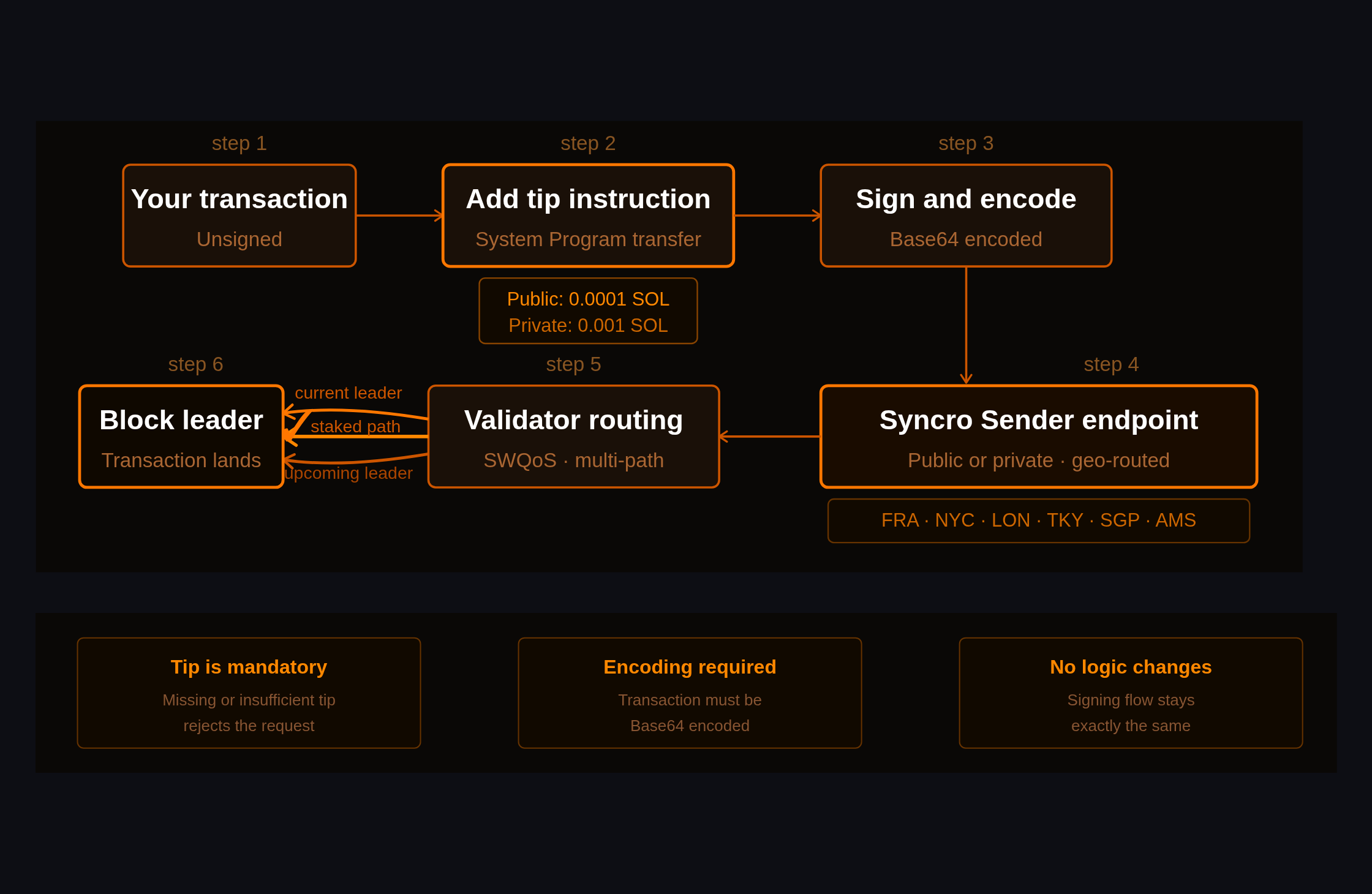
- Requires a tip of 0.0001 SOL (100,000 lamports) inside the transaction
- Rate limited to 1 request per second
- Best for quick testing
Available endpoints:
- Frankfurt:
http://sfls-geo-fra.l2.p2p.org/public - New York:
http://sfls-geo-nyc.l2.p2p.org/public - London:
http://sfls-geo-lon.l2.p2p.org/public - Tokyo:
http://sfls-geo-tky.l2.p2p.org/public - Singapore:
http://sfls-geo-sgp.l2.p2p.org/public - Amsterdam:
http://sfls-eu1.l2.p2p.org/public
Private endpoint (API key)
- Requires API key authentication
- Requires a tip of 0.001 SOL (1,000,000 lamports). For the first month, the tip is reduced to 0.0001 SOL as part of the production benchmark period
- Supports up to 50 requests per second
- Supports full RPC methods
To get access, request it via the Syncro Sender page or contact the team.
Step 2: Add a Tip to Your Transaction
A tip is required for both public and private endpoints.
Minimum tip
- Public: 100,000 lamports (0.0001 SOL)
- Private: 1,000,000 lamports (0.001 SOL)
How to add the tip
Add a System Program transfer instruction to a valid tip account:
transaction.addInstruction(
SystemProgram.transfer(
yourPublicKey,
'BPZrtYhdoAhiHWV5EgGLoV7bZFbMamBZurGDq4DmST8v',
100000
)
);transaction.addInstruction(
  SystemProgram.transfer(
    yourPublicKey,
    'BPZrtYhdoAhiHWV5EgGLoV7bZFbMamBZurGDq4DmST8v',
    100000
  )
);
Common errors
- Missing tip → request fails
- Insufficient tip → request fails
Error example:
"Insufficient tip: provided X lamports, required Y lamports"
Public endpoint request
curl -X POST <https://sfls.l2.p2p.org/public> \\
  -H "Content-Type: application/json" \\
  -d '{
    "jsonrpc": "2.0",
    "id": 1,
    "method": "sendTransaction",
    "params": ["<BASE64_ENCODED_TX_WITH_TIP>", {"encoding": "base64"}]
  }'
Private endpoint request
curl -X POST <https://sfls.l2.p2p.org> \\
  -H "Content-Type: application/json" \\
  -H "Authorization: Bearer YOUR_API_KEY" \\
  -d '{
    "jsonrpc": "2.0",
    "id": 1,
    "method": "sendTransaction",
    "params": ["<BASE64_ENCODED_TX>", {"encoding": "base64"}]
  }'
Response
{
  "jsonrpc": "2.0",
  "result": "<TRANSACTION_SIGNATURE>",
  "id": 1
}
Once integrated, test Syncro Sender alongside your current setup.
Focus on:
- landing success rate
- time to confirmation
- consistency under load
Use your standard RPC to monitor transaction status. Private endpoint users can also use Syncro Sender for all standard Solana RPC requests, including status checks and confirmation queries.
Performance Best Practices
To get the best results:
- Use
skipPreflight: trueto reduce latency - Use base64 encoding
- Reuse HTTP connections with keep alive
- Add a priority fee for validator scheduling
Retry strategy
- 429 → wait and retry
- 500 → retry with backoff
- 400 → fix request
- network error → retry
Submitting the same transaction multiple times is safe.
Common Mistakes to Avoid
- Sending transactions without a tip
- Using Syncro Sender for read requests on the public endpoint
- Not adding priority fees for competitive execution
- Opening new connections for every request
- Ignoring rate limit headers
When to Use Public vs Private
| Use case | Recommendation |
|---|---|
| Testing | Public endpoint |
| Production trading | Private endpoint |
| High frequency workflows | Private endpoint |
What This Setup Actually Changes
Syncro Sender does not change your transaction logic.
It changes how your transactions are delivered.
That means:
- better routing
- higher landing probability
- more consistent execution
Get Started
You can start immediately using the public endpoint.
For production use cases, request access to the private endpoint.
For the full technical reference and advanced configuration options, visit the Syncro Sender documentation.
👉 Syncro Sender: https://www.p2p.org/products/syncro-solana-transaction-sender
👉 Docs: https://docs.p2p.org/docs/syncro-sender-overview
FAQ
Do I need an API key to use Syncro Sender?
No. The public endpoint requires only a tip of 0.0001 SOL in the transaction.
What happens if I do not include a tip?
The transaction will be rejected with an error.
Can I use Syncro Sender for read requests?
Only on private endpoints with this feature enabled.
How do I check if my transaction landed?
Use a standard Solana RPC method such as getSignatureStatuses.
What encoding should I use?
Base64 encoding is required and recommended.
Fito Benitez